What Model Should I Use for Cursor AI in 2026? (A Builder's Guide)
If you're wondering how to get the most out of Cursor, you've likely asked yourself: What model should I use? How do I make the best use of Cursor AI? And is there any way to run it without going broke?

In this guide, I'm breaking down exactly what models you should use, which ones to avoid, and how to navigate Cursor's backend so you don't destroy your momentum running into rate limits or get hit with a massive overage bill at the end of the month.
Is Cursor Better Than Copilot (And Is the $20 Pro Plan Worth It?)
If you are a serious builder looking to bring software ideas to life, Cursor is arguably the single best tool on the market. If you are comparing it to GitHub Copilot, Cursor's autonomous agent capabilities and multi-file understanding put it in a different league.
Honestly, it has been a long time since I've been on the free tier, but the pain points are universally the same. On the free version, Cursor often debates with you rather than actually doing the work. For example, if you wanted to commit your code to GitHub, it would walk you through the process step-by-step from the command line. On the paid Pro version ($20/month), the agent automatically executes these tasks without pushback, saving you time and friction.
If there is one AI tool that is absolutely worth the subscription, it is Cursor. But once you upgrade, a new problem emerges: choosing the right brain for the editor.
The Pricing Trap: What Model Should I Use?
Here is the hard truth about the paid plan: not all models are created equal, and they don't consume your limits equally.
Cursor bills individual plans through two separate usage pools that reset each billing cycle. Your Auto + Composer pool covers everyday agent work when you use Auto or Composer 2.5 — Cursor includes generous usage there. Your API pool is what burns when you pin a specific frontier model: Pro includes $20 of API usage per month (Pro Plus $70, Ultra $400).
You see everyone online hyping up Anthropic's Claude Opus 4.8 and the new Claude Fable 5 tier. What they do not tell you is how fast those models eat API credits — Fable bills at roughly 2× Opus list rates. If you leave a heavy model selected by default, you can burn through your $20 API pool in days. Once you hit that limit, you either stop or trigger pay-as-you-go overages that can easily run you $200 to $300 in a single month.
Cursor API pool & overage estimator— plug in your plan, model, and weekly token load to see your stay-in-pool budget (4 weeks per billing month) and what on-demand overage could look like.
Cursor API pool quick estimate
Rates from Cursor docs (2026-06-16). Not official billing.
8.0M/week × 4 weeks = 32.0M this billing month. Stay under ~0.5M/week on this model to keep within your $20 API pool.
If on-demand is on: ≈ $332.00 beyond included this month. Turn it off to cap spend — see below.
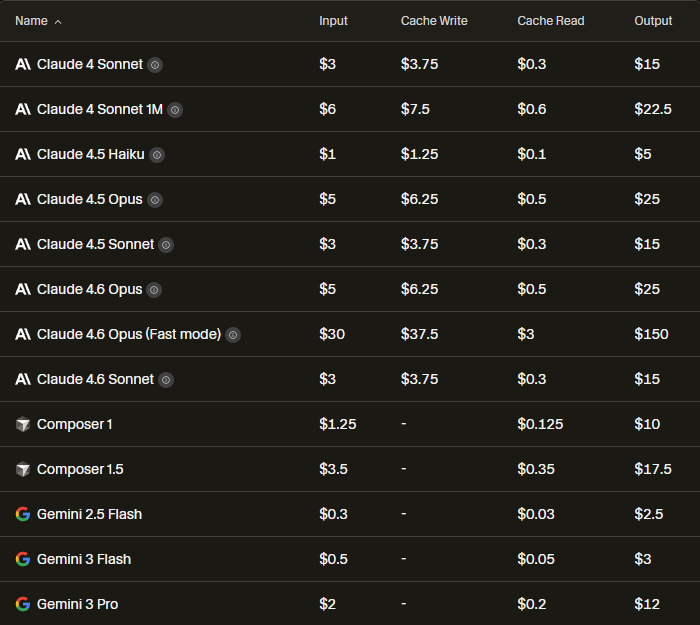
Don't try to use all of these models at once. Pick a couple, test them for a few days, and switch based on your needs. Here is my current stack:
For Heavy Coding and Logic:
- Composer 2.5: My default for agentic coding. Fast, accurate, and draws from the Auto + Composer pool when you are not pinning a frontier API model — so you get far more runway than living on Opus all day.
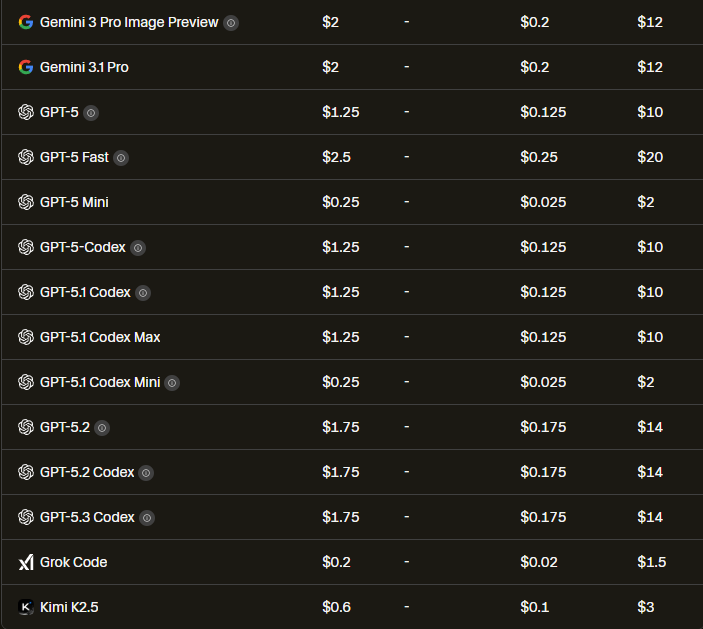
- GPT-5.3 Codex: A strong alternative when you need a different perspective on a stubborn code block, with solid value at API list rates.
- Claude Opus 4.8: Expensive but powerful. Save this for your hardest architectural tasks or when Composer 2.5 gets completely stuck.
- Composer 2.5 (Fast): When you need speed and accept higher API list rates — use sparingly if you are watching your $20 API pool.
- Claude Fable 5: Last resort only. Powerful, but roughly 2× Opus pricing — a single heavy week can wipe your included API credits.
For Writing and Context:
- Claude 4.6 Sonnet: Still the best all-around model for writing and documentation, though it is moderately expensive on the API pool.
Do This Before You Do Anything Else: Turn Off On-Demand Usage
Before you start burning through models and building out your stack, there is one setting you need to check immediately. Cursor has an on-demand usage option in your account settings that, if left on, will automatically charge you beyond your monthly credit pool whenever you exceed your limits.
This means you could blow past your $20 in credits and keep getting charged in the background without a single warning. For heavy users running long agent sessions or multi-file rewrites, that bill can stack up fast.
Here is what to do. Go to your Cursor settings, navigate to the billing or usage section, and locate the on-demand usage toggle. Turn it off. This caps your spending at your plan limit and prevents any surprise charges at the end of the month. If you later decide you need the extra headroom for a big project sprint, you can always go back and flip it on. But starting with it off is the safer default, especially while you are still figuring out which models fit your workflow.


Related Article
How to Use Cursor AI in 2026: The Zero-BS Beginner's Guide
Learn Cursor basics: Composer vs Plan vs Ask, split-screen workflow, Cursor vs ChatGPT for coding, and how .cursorrules keep your codebase consistent and your secrets off GitHub.
Read Now →The Best Free Model for Cursor (Running Local AI)
If you are balling on a budget, experimenting with multi-agent workflows, or just want to avoid API costs entirely, you have options.
First, Cursor lists several models that offer strong value per million tokens when you need volume without burning API credits on Opus: Grok Build 0.1, Gemini 3.5 Flash, and Composer 2.5 at API list rates when pinned. They are a good fit for high-volume agent runs while you keep heavy models off your default selection.
Quick Recap: Cursor AI FAQ
If you are just skimming, here are the bottom-line answers to the most common questions about setting up your Cursor workspace.
What model should I use for Cursor AI?
Use Composer 2.5 for daily agentic coding (Auto + Composer pool), GPT-5.3 Codex for a second opinion on stubborn code, Claude Opus 4.8 for hard architecture, and Claude 4.6 Sonnet for writing. Save Claude Fable 5 for rare last-resort tasks — it bills at roughly 2× Opus list rates.
Is Cursor better than GitHub Copilot?
Yes. Copilot is a great autocomplete tool, but Cursor's autonomous agent capabilities and multi-file understanding put it in a completely different league for building software.
Is buying the Cursor AI Pro plan worth it?
Absolutely. For $20 a month, Pro includes $20 of API-pool usage plus generous Auto + Composer pool access. The agent executes terminal and Git tasks without pushback — but you still need to pick models wisely so you do not burn API credits on Opus or Fable by default.
What is the best free/cheap model for Cursor?
Grok Build 0.1, Gemini 3.5 Flash, and Composer 2.5 (at API list rates when pinned) offer strong value per million tokens for budget-conscious builders or high-volume agent runs.
Related Reading
Explore more on Cursor, AI tools, and developer workflows:
- The Bare Minimum: What It Actually Takes to Run a Self-Hosted LLM (Without Losing Your Mind)
- Why I'm Moving Away from ChatGPT in 2026 (And You Should Too)
- How to Use Cursor AI in 2026: The Zero-BS Beginner's Guide
- How to Use Gemini Notebooks in 2026 (The Context Bottleneck is Solved)
Ready to build your content engine?
Get a free 20-minute audit of your current processes and discover which workflows you can automate today.
Book a Free System Audit