Why I Switched to Adobe Firefly Mobile (The Real Reason Isn't the Adobe Model)
How Nano Banana + Firefly Mobile Became the Only Mobile AI Workflow That Doesn't Break
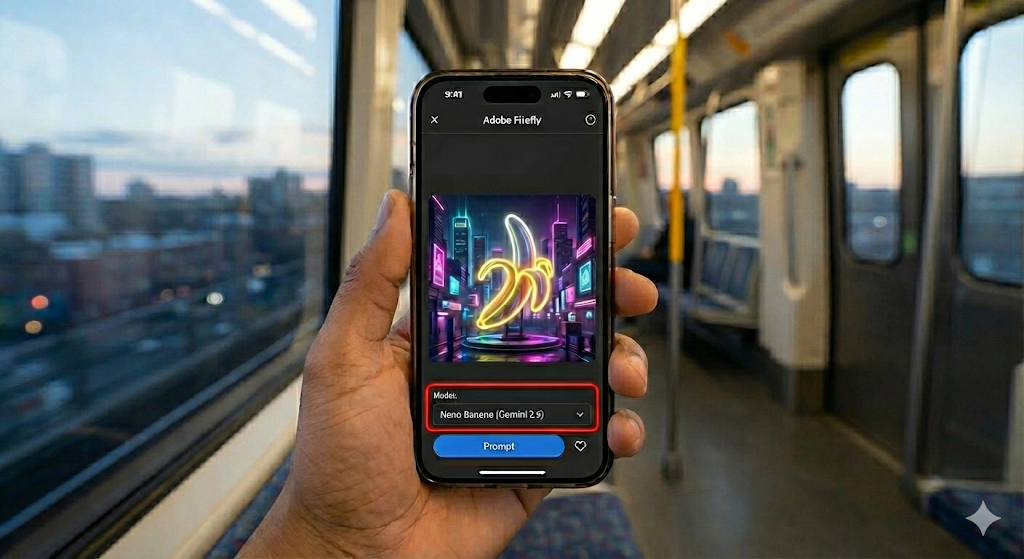
Most mobile AI apps break the moment you need to switch modes or continue a workflow. Firefly Mobile quietly solves this by pairing Adobe's UI with Nano Banana (Gemini 2.5). Here's why it's the most complete mobile creator studio right now.
If you're a mobile creator, you've probably dealt with this:
You open an AI app to generate an image, switch modes, and suddenly—
- your chat resets
- your context disappears
- half the features are missing
- or the mobile version doesn't match the desktop at all
This isn't a compute problem.
It's not a "Discord is clunky" problem.
It's a product design problem.
And it's exactly why I switched to Adobe Firefly Mobile—
not because of the Firefly model,
but because it's the only mobile AI app that doesn't break the moment you try to do real work.
Here's the surprising part:
🔥 Firefly Mobile quietly gives you access to Nano Banana (powered by Gemini 2.5), and that's what makes it the best mobile AI studio available right now.
Let's walk through why this combination works when everything else falls apart.
1. The Real Mobile Problem: AI Apps That Look Good on Paper but Break in Practice
The issue isn't Discord.
Midjourney actually runs beautifully on mobile for what it's designed to do: generate images.
The real frustration comes from AI apps that pretend to be mobile-first… until you try to do anything serious.
Example: Grok
It has:
- a mobile app
- X account integration
- powerful hardware behind it
But when you log in, your chats from X do not sync into the Grok app.
Your entire conversational history is fragmented:
- Some chats live in X
- Some live in the app
- Context is split
- Workflows die instantly
All that compute means nothing if the product itself is inconvenient.
Example: Gemini Mobile
Gemini is an amazing model.
But the mobile interface has a huge problem:
When you're generating images, you cannot switch back to text mode without opening a new chat.
That means:
- you lose context
- you lose continuity
- you lose your work flow
- and your creative session gets interrupted
For mobile creators, that's a dealbreaker.
This is the real enemy:
AI apps that break your flow the moment you switch formats or modes.
2. The Hidden Advantage of Firefly Mobile: Nano Banana Runs on Gemini 2.5
Inside the Firefly Mobile app, Nano Banana doesn't run on Gemini 3.
It runs on Gemini 2.5.
And here's why that's actually a win for mobile creators:
✔ Gemini 2.5 is lighter and more stable
Mobile generation needs consistency more than it needs cutting-edge variance.
✔ Obeys prompts better than Gemini 3
Especially for:
- text rendering
- logos
- geometric layouts
- thumbnail templates
- UIs and shapes
Gemini 3 is more artistic but less obedient.
✔ No mode-reset issues
Unlike Gemini's own mobile app, switching between:
- text
- image
- edit
does not break context.
✔ Faster on LTE/5G
You don't need a desktop connection or perfect Wi-Fi.
The big takeaway:
Firefly Mobile gives you a version of Gemini that's optimized for practical, on-the-go creation.
Not experimental outputs.
Not chaotic interpretations.
Just clean, precise results.
3. The Multi-Model Workflow: The Real Reason Firefly Mobile Wins
Firefly isn't just "another image generator."
It's a mobile creative studio because it allows something no other AI app currently supports:
🔥 Model Hopping.
You use the right model for the right stage — all inside the same app.
Here's the workflow that makes it unbeatable:
Step 1 — Use Nano Banana (Gemini 2.5) For:
- clean shapes
- logos
- icons
- text in images
- storyboard sketches
- precise compositions
It follows instructions better than Gemini 3 and generates assets that are usable, not experimental.
Step 2 — Switch to Adobe Firefly Image 3 For:
- photorealistic textures
- skin + lighting
- depth
- mood
- stylistic finishing
Firefly excels at realism and glossy, cinematic visual quality.
Step 3 — Use Generative Fill For:
- fixing hands
- expanding backgrounds
- retouching
- compositing
- cleanup
This is where Adobe's years of visual tooling turn into a superpower.
The best part?
You do all of this inside the same mobile app without losing:
- context
- mode history
- your workflow
- your assets
This alone puts Firefly Mobile in a separate category from:
- Midjourney (images only)
- Gemini (mode switching resets workflows)
- Grok (fragmented chat history)
- DALL·E 3 (mobile UI is stripped down)
4. Tutorial: The "Commuter Creator" Workflow
Imagine this scenario:
You're on the bus, train, or sitting in the passenger seat, and you need to make a thumbnail in 10 minutes.
Here's how it actually works with Firefly Mobile:
1. Open Firefly Mobile
2. Select Nano Banana (Gemini 2.5)
Generate the base character or composition.
Precise. Clean. Fast.
3. Switch to Firefly Image 3
Add:
- lighting
- realism
- surface detail
4. Use Generative Fill
Fix any imperfections.
5. Save to Creative Cloud
Your assets sync instantly to your desktop.
6. Finish in Photoshop or Illustrator (optional)
No lost chats.
No split history.
No broken sessions.
No "start over in a new chat."
This is the first true mobile-first AI studio.
5. The Asset Trap (And How to Turn It Into a Business)
Here's the thing about mobile creation:
You'll generate 20+ assets in a single session…
And then they get buried in your camera roll.
Lost. Forgotten. Unusable.
That's why I built a workflow inside Creator System OS:
"Anything I make on Firefly Mobile auto-syncs into my Notion dashboard so I can tag it, organize it, and sort it by project."
Ideas made on the bus become assets that ship.
6. Final Verdict: Why I Really Switched
Firefly Mobile isn't just an "Adobe image app."
It's:
- ✔ The cleanest UI
- ✔ The best context retention
- ✔ The only app that allows multi-model workflows
- ✔ The easiest export into a real creative pipeline
- ✔ The only mobile app where Nano Banana (Gemini 2.5) is truly stable
Midjourney is great — but images only.
Gemini is great — but the mobile UI slows you down.
Grok is powerful — but fragmented.
Firefly Mobile is the only mobile tool that behaves like a studio, not a demo.
If you care about mobile creation, this is the current king.
Related Reading
Explore more AI tools and workflows:
- Nano Banana Pro vs GPT-5.1: Which AI Image Model Actually Performs Better?
- How to Generate Clean, Brand-Ready Website Images Using ChatGPT 5.1
- GPT-5.1 vs Gemini 3: Which AI Model Is Better for Real Creative Workflows?
- The Worst Thing About Gemini 3 Pro (That No One Talks About)
Creator System OS
$24
Organize all your ideas and AI outputs. Turn mobile creativity into real deliverables with a system that auto-syncs your Firefly Mobile assets into your Notion dashboard.
Ready to build your content engine?
Get a free 20-minute audit of your current processes and discover which workflows you can automate today.