How Students Can Use AI to Study More Efficiently
A simple guide to using AI tools for smarter studying, better organization, and faster research—without breaking academic rules or relying on AI to write your papers.

What is the most efficient way to use AI for studying? The most efficient way for students to use AI is to treat it as a personal tutor and organization assistant rather than a writer. Instead of generating essays (which risks academic integrity), students should use AI workflows to summarize long lectures, analyze PDF textbooks, and structure semester deadlines.
The good news?
You can use AI ethically and effectively to make studying easier, faster, and more organized—without breaking academic rules.
Here's a list of practical, student-friendly ways to use AI when you're cramming for finals or trying to keep up during busy weeks.
1. Use Gemini to Break Down Long YouTube Lectures
Gemini is one of the best tools for turning long videos into digestible notes.
Try this workflow:
- Paste a YouTube link into Gemini
- Ask: "Give me a study guide / summary of this lecture."
- Then ask follow-ups:
- "What concepts should I focus on?"
- "Which topics seem most important?"
- "Explain these definitions in simple terms."

You get a high-level overview in minutes—so you can spend your study time on the parts you don't understand instead of rewatching the entire lecture.
Perfect for:
- 1–2 hour lectures
- confusing professors
- last-minute review sessions
2. Use Adobe Acrobat AI for PDF Summaries
If your classes rely heavily on PDFs (textbooks, journal articles, case studies), Adobe Acrobat's new AI features are a game-changer.
You can ask Acrobat to:
- summarize a chapter
- extract key points
- answer specific questions
- highlight relevant parts for an assignment
- find where a topic appears in the document
Just upload your PDF and use prompts like:
"Summarize this document in bullet points with key terms and definitions."

"What does this article say about X?"

"Explain this section in simpler language."
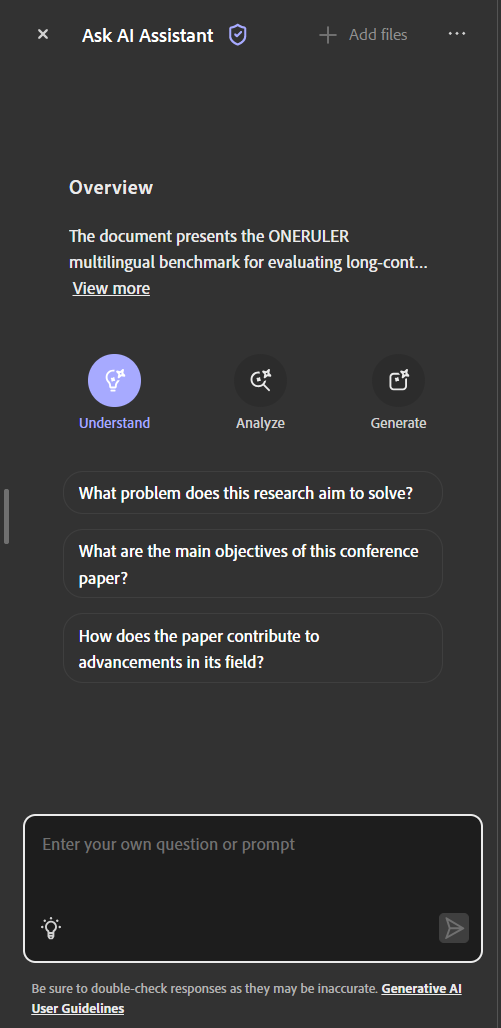
It cuts your reading time in half—while still leaving you in full control of your writing and interpretation.
3. Use Notion (and GPT) to Organize Your Entire Semester
Organization = efficiency.
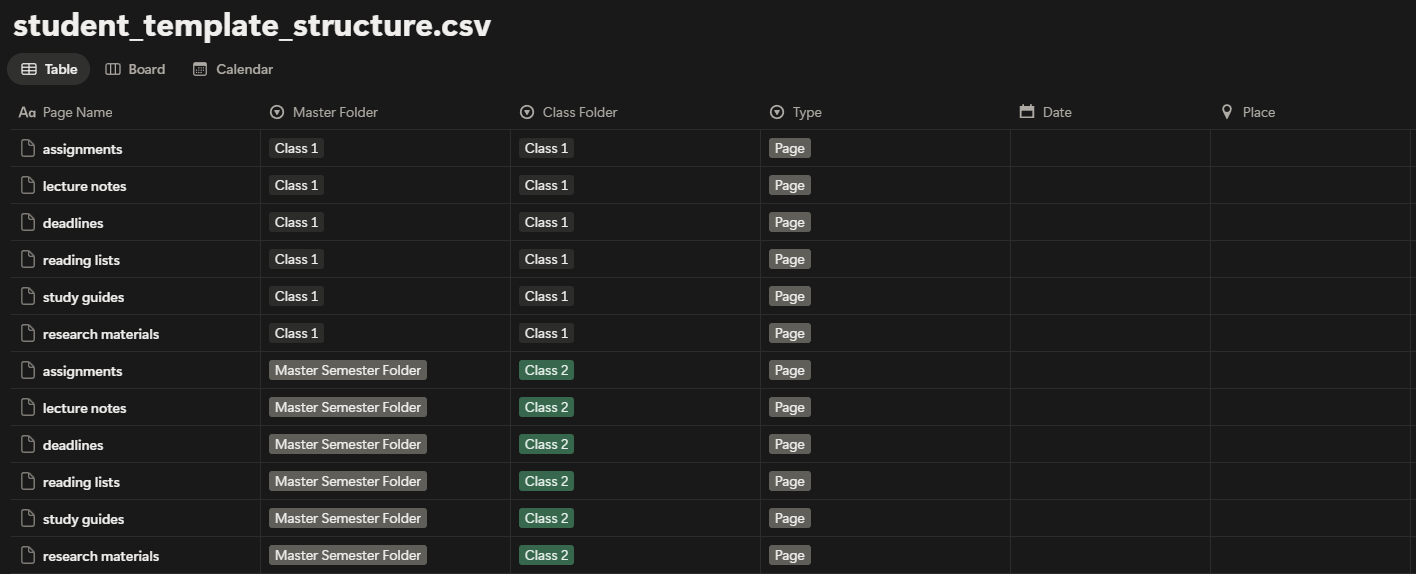
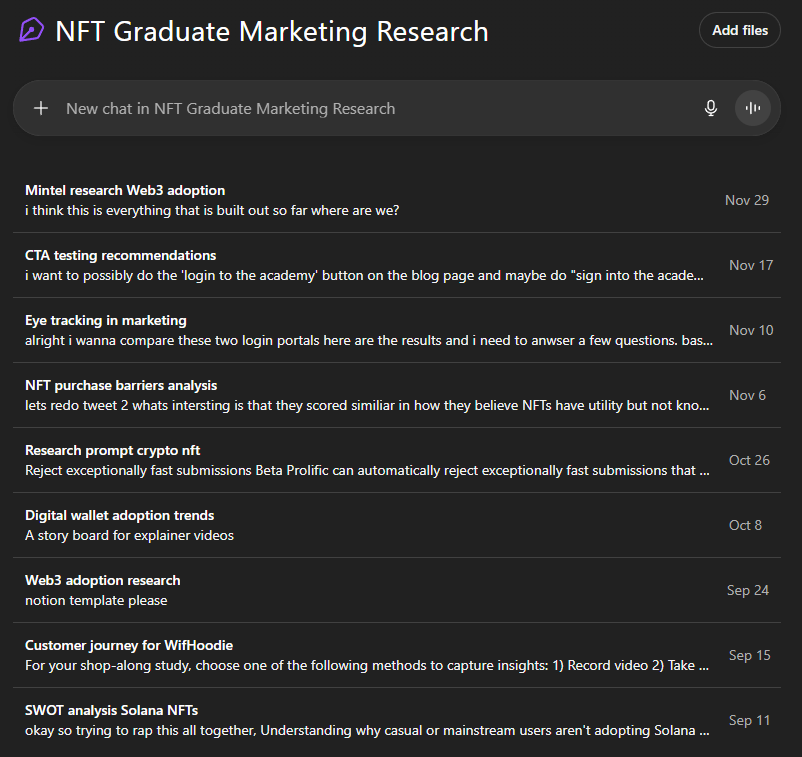
One of the most underrated study hacks is setting up class folders in Notion (and even in ChatGPT) at the start of the semester.
Here's the system:
In Notion:
- Create a master folder for your semester
- Add a subfolder for each class
- Add pages for:
- assignments
- lecture notes
- deadlines
- reading lists
- study guides
- research materials
In ChatGPT:
- Create a "Class Workspace" for each course
- Store your prompts, questions, and summaries
- Revisit whenever you need clarity
Doing this early:
- keeps everything in one place
- reduces decision fatigue
- saves time searching for documents
- helps you retrieve info instantly when writing papers or prepping for exams
If databasing feels overwhelming, don't worry—start with a simple template.
(You can explore my other Notion guides or book a consultation if you want help setting it up.)
4. Use AI as a Tutor—Not a Shortcut
The safest and most effective way to use AI is to treat it like a tutor.
Try asking:
- "Explain this concept like I'm five."
- "Give me three example problems."
- "Walk me through this step-by-step."
- "Why does this topic matter?"
- "Test me with 5 quiz questions."
When you use AI to understand, not to replace, your learning becomes deeper and faster.
5. Use AI for Faster Brainstorming and Planning
Before writing your paper, you can ask AI to help you:
- outline your argument
- compare angles
- build a thesis
- expand on research topics
- break down complex readings
- generate citations you can verify later
This makes drafting way smoother—while still keeping your work original.
Just don't copy/paste the AI's writing.
Use it to think better, not to think for you.
Pro Tip: Always Personalize What AI Gives You
You can regenerate responses or click into the text and say:
- "Make this simpler"
- "Explain this visually"
- "Condense this to bullet points"
- "Give me practice questions based on this"
AI is a conversation, not a vending machine.
The more you refine, the more helpful it becomes.
Want an Even More Organized Semester?
If school feels chaotic—too many deadlines, too many PDFs, too many notes—you're not alone.
Most students don't struggle because the material is hard.
They struggle because their system isn't working.
If you want a clean, organized setup that makes studying easier, check out:
The Student Notion Dashboard + AI Study System
You get:
- class folders
- task management
- study templates
- research organizers
- reading trackers
- lecture note structure
- ChatGPT study prompts
It's like giving your brain a second brain.
Want a more efficient semester? Check out The Student Notion Dashboard to get the full system set up.
Start Free: Simple Assignment Tracker
Not ready for the full dashboard? Start with our free assignment tracker — a simple Notion template that helps you keep track of deadlines, assignments, and due dates.
It's a lightweight version perfect for getting organized without overwhelm. Import it into Notion and start tracking your assignments today.
📋 Download the Free Assignment Tracker
Drop your email below and get the Notion-ready assignment tracker sent instantly. No spam. Just free tools.
Related Reading
Explore more AI tools and workflows:
- How I Use AI to Organize My Week Inside Notion
- Notion for Creators — The Simple Dashboard That Runs Your Entire Brand System
- AI Prompting Essentials — The Skills Every Creator Needs in 2025
- Stop Chasing Every New AI Tool — Here's What's Actually Worth Learning (Perplexity AI / ChatGPT / Gemini)
Ready to build your content engine?
Get a free 20-minute audit of your current processes and discover which workflows you can automate today.